Work / Investigative visualization
Relationship Map Explorer
Interactive network maps that show investigators who sits closest to a subject, and who might be worth a phone call.
Many investigations involve hundreds of entities: people, former employees, companies, funds, banks, investors. Clients and investigators need to see, at a glance, who might be useful to talk to because of how close they sit to the subject.
The problem
- A large number of entities and connections.
- Categorizing both entities and relationships.
- Turning research notes into data.
- An interface that gives fast access to all of it.
- Usually a two-week turnaround.
Approach
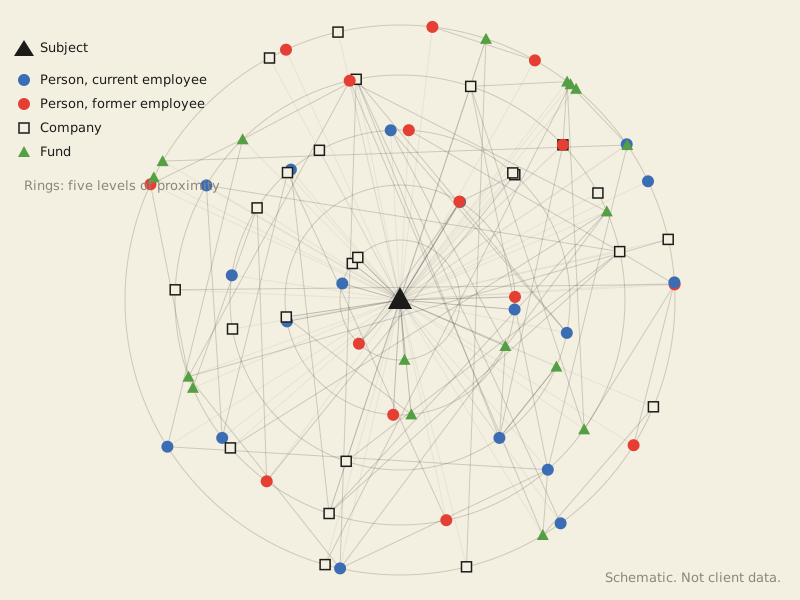
Every case is different, but most of these maps start from a modified D3 force simulation. In one case, closeness to the subject was the key factor. We assigned every entity one of five levels of proximity and used that as a radial position: the closer the ring, the closer the tie. Shape showed entity type. Color showed employment status, because that decided whether someone could be approached.
What it does
The map opens on the big picture: which nodes have the most connections, and how close they sit to the center. Pan and zoom to explore. Click a node to isolate its direct connections. Hover to read a short summary of our research on that person or company.